Sunday, October 30, 2016

Java Applet House Design

 /** Applet Using To Design House  /*

package applet;

import java.awt.*;
import java.applet.*;

public class DrawingHouse extends Applet
{
public void init()
{
setSize(500,400);
}
public void paint(Graphics g)
{
   setBackground(Color.red);
    //Drwaw clouds
    g.setColor(Color.WHITE);
    g.fillOval(30, 30, 40, 40);
    g.fillOval(60, 30, 40, 40);
    g.fillOval(80, 30, 40, 40);
    g.fillOval(40, 10, 40, 40);
    g.fillOval(70, 10, 40, 40);
   
    g.fillOval(160, 10, 20, 20);
    g.fillOval(175, 10, 20, 20);
    g.fillOval(190, 10, 20, 20);
    g.fillOval(170, 20, 20, 20);
    g.fillOval(185, 20, 20, 20);
   
   
    //Draw Roof
    g.setColor(Color.red);
    int xs[] = {100,160,220};
    int ys[] = {100,58,100};
   // int[] ys = null;
Polygon poly=new Polygon(xs,ys,3);
    g.fillPolygon(poly);
    //For Body Of The House
    g.setColor(Color.blue);
    g.fillRect(100,100,120,120);
   
    //draw the door
    g.setColor(Color.white);
    g.fillRect(145, 160, 30, 60);
   
    //For Sun
    g.setColor(Color.yellow);
    g.fillOval(240, 30, 50, 50);
   
    //for clouds
    g.setColor(Color.white);
    g.fillOval(260,50,30,30);
    g.fillOval(280, 50, 30, 30);
    g.fillOval(300, 50, 30, 30);
    g.fillOval(270, 40, 30, 30);
    g.fillOval(298, 40, 30, 30);
   
    //draw the door
    g.setColor(Color.white);
    g.fillRect(145, 160, 30, 60);
   
    //for Chimney
    g.setColor(Color.black);
    g.fillRect(128,55,10,30);
   
    //door block & 2 window
    g.setColor(Color.black);
    g.fillRect(145, 160, 30, 60);
    g.setColor(Color.magenta);
    g.fillPolygon(poly);
   
    //For Window
    g.setColor(Color.white);
    g.fillRect(115,125,25,25);
   
   
    //cross bar window
    g.setColor(Color.black);
    g.drawLine(127, 125, 127, 150);
   
    //window2
    g.setColor(Color.white);
    g.fillRect(180, 125, 25, 25);
   
    //window 2 cross bar
    g.setColor(Color.black);
    g.drawLine(192, 125, 192, 150);
   
    //B standard
    //Draw grass
    g.setColor(Color.orange);
    g.fillRect(0,200,300,40);
   
    // draw tree
    g.setColor(Color.gray);
    g.fillRect(28, 100, 20, 100);
    g.setColor(Color.green);
    g.fillOval(0,40,80,80);
   
    // author Label1
    g.setColor(Color.cyan);
    g.drawString("Anuj Kumar Rey ", 280,300);
}
}

OutputScreen


Monday, October 24, 2016

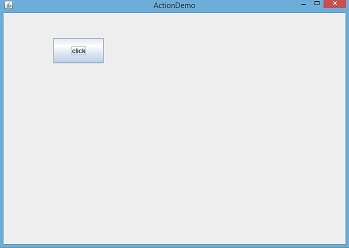
How to write Action Listener for a JButton(Swing JButton Event)

import javax.swing.*;
import java.awt.*;

class MyFrame extends JFrame {
JButton btn=new JButton("click");
Container c;
MyFrame()
{
c=this.getContentPane();
c.setLayout(null);
btn.setBounds(100,50,100,50);
c.add(btn);
}
}
class AcionDemo
{
public static void main(String[] args)
{
MyFrame f=new MyFrame();
f.setTitle("ActionDemo");
f.setVisible(true);
f.setDefaultCloseOperation(JFrame.EXIT_ON_CLOSE);
f.setBounds(100,50,700,500);
}
}

/**OutputScreen*/


/** 
 * simply displays Diffrent Button Color Using ActionListener.
 */
import javax.swing.*;
import java.awt.*; import java.awt.event.*; class MyFrame extends JFrame implements ActionListener { JButton btn1=new JButton("RED"); JButton btn2=new JButton("YELLOW"); JButton btn3=new JButton("GREEN"); JButton btn4=new JButton("BLACK"); JButton btn5=new JButton("BLUE"); JButton btn6=new JButton("GRAY"); Container c; MyFrame() { c=this.getContentPane(); c.setLayout(null); btn1.setBounds(100,50,100,50); btn2.setBounds(200,50,100,50); btn3.setBounds(300,50,100,50); btn4.setBounds(400,50,100,50); btn5.setBounds(500,50,100,50); btn6.setBounds(600,50,100,50); btn1.addActionListener(this); btn2.addActionListener(this); btn3.addActionListener(this); btn4.addActionListener(this); btn5.addActionListener(this); btn6.addActionListener(this); c.add(btn1); c.add(btn2); c.add(btn3); c.add(btn4); c.add(btn5); c.add(btn6); } public void actionPerformed(ActionEvent e) { //c.setBackground(Color.YELLOW); if(e.getSource()==btn1) { c.setBackground(Color.RED); } if(e.getSource()==btn2) { c.setBackground(Color.YELLOW); } if(e.getSource()==btn3) { c.setBackground(Color.GREEN); } if(e.getSource()==btn4) { c.setBackground(Color.BLACK); } if(e.getSource()==btn5) { c.setBackground(Color.blue); } if(e.getSource()==btn6) { c.setBackground(Color.gray); } } } class AcionDemo { public static void main(String[] args) { MyFrame f=new MyFrame(); f.setTitle("ActionDemo"); f.setVisible(true); f.setDefaultCloseOperation(JFrame.EXIT_ON_CLOSE); f.setBounds(100,50,700,500); } }

//*OutputScreen*/


Sunday, September 25, 2016


LoginFrame

Step For Creating LoginFrame
To Create Two Class e.g.LoginFrame & Splashscreen
1. For LoginFrame

/* LoginFrame */
import javax.swing.*;
import java.awt.*;
import java.awt.event.*;

public class LoginFrame implements ActionListener {

JFrame frame;
private  JPanel panel1;
private  JPanel panel2;
private  JPanel panel3;
private JButton loginBtn;
private JButton exitBtn;
private JLabel nameLbl;
private JLabel userLbl;
private JLabel passwordLbl;
private  JTextField userTxt;
private  JPasswordField passwordTxt;

 public String loginname;
public String loginpass;

// class Veriables
Dimension screen = Toolkit.getDefaultToolkit().getScreenSize();


public LoginFrame()
{


panel1 = new JPanel();
panel1.setLayout(new FlowLayout());
nameLbl = new JLabel("WELCOME");

panel2 = new JPanel();
panel2.setLayout(new GridLayout(2,2));
userLbl = new JLabel("Username :");
userTxt = new JTextField(20);

passwordLbl = new JLabel("Password :");

passwordTxt = new JPasswordField(20);

panel3 = new JPanel();
panel3.setLayout(new FlowLayout());

loginBtn = new JButton("Login", new ImageIcon(LoginFrame.class.getResource("images/Key.gif")));

loginBtn.addActionListener(this);
exitBtn = new JButton("Exit", new ImageIcon(LoginFrame.class.getResource("images/Keys.gif")));

exitBtn.addActionListener(this);
panel1.add(nameLbl);
panel2.add(userLbl);
panel2.add(userTxt);
panel2.add(passwordLbl);
panel2.add(passwordTxt);
panel3.add(loginBtn);
panel3.add(exitBtn);
frame = new JFrame("Login Frame...");
frame.setSize(300,200);

Container pane = frame.getContentPane();   


pane.setLayout(new GridLayout(3,1));
pane.add(panel1);
pane.add(panel2);
pane.add(panel3);

 frame.setIconImage(new ImageIcon("images/Business.png").getImage());
frame.setResizable(false);
frame.setLocation((screen.width - 500)/2,((screen.height-350)/2));
frame.setVisible(true);
frame.addWindowListener(new WindowAdapter()
{
public void windowClosing(WindowEvent e)
{
System.exit(0);
}
});
            }

public void actionPerformed(ActionEvent event)
{
Object source = event.getSource();
if(source.equals(loginBtn))
{
login();

} 
else if(source.equals(exitBtn))
{
System.exit(0);
}
}

public void login()
{
loginname = userTxt.getText().trim();
loginpass = passwordTxt.getText().trim();

//write sql query
}


public static void main(String[] args)
{

 SplashScreen FormSplash = new SplashScreen();
  Thread ThFormSplash = new Thread(FormSplash);
ThFormSplash.start();
    while(!FormSplash.isShowing())
    {
      try
      {
        //Display the FormSplash for 2 seconds
        Thread.sleep(2000);
      }
      catch(InterruptedException e)
      {
      }
    }
 FormSplash.dispose();

LoginFrame frame1 = new LoginFrame();

// MainMenu menu = new MainMenu(loginname,currentdate);


}
}

 2. For SplashScreen 

   /* SplashScreen */
import javax.swing.*;
import java.awt.*;
import javax.swing.border.LineBorder;

public class SplashScreen extends JWindow implements Runnable
{
public void run()
{
JLabel SplashScreenLabel = new JLabel(new ImageIcon("pharmacy_rx.png"));
Dimension screen = Toolkit.getDefaultToolkit().getScreenSize();
Color cl = new Color (255,200, 120);
SplashScreenLabel.setBorder (new LineBorder (cl, 10));

getContentPane().add(SplashScreenLabel,BorderLayout.CENTER);

setSize(395,310);
setLocation((screen.width-500)/2,(screen.height-500)/2);
show();
}
}

Note
/*To add  two icon e.g.- Login & Exit Button Icon*/
/*Also to add  SplashScreen(Time) Image.*/

OUTPUT SCREEN


Saturday, September 24, 2016

RegistrationDemo

import javax.swing.*;
import java.awt.*;
import java.awt.event.*;
class RegistrationDemo
{
static JTextField name_tf;
static JTextField mobile_tf;
static JComboBox day;
static JComboBox month;
static JComboBox year;
static JRadioButton male;
static JRadioButton female;
static JTextArea add_ta;
static JCheckBox tandc;
static JButton submit;
static JTextArea output;
public static void main(String args[])
{

JFrame frame=new JFrame("RegistrationDemo");
frame.setVisible(true);
frame.setDefaultCloseOperation(JFrame.EXIT_ON_CLOSE);
frame.setBounds(200,100,800,600);

Container cntr=frame.getContentPane();
cntr.setLayout(null);
cntr.setBackground(Color.YELLOW);

JPanel panel = new JPanel();
panel.setBackground(new Color(255, 204, 0));
panel.setBorder(new TitledBorder(null, "Personal Details", TitledBorder.CENTER, TitledBorder.TOP, null, new Color(255, 0, 0)));
panel.setBounds(20, 78, 808, 616);
add(panel);
panel.setLayout(null);

JLabel name_label=new JLabel("Name");
name_label.setBounds(50,50,60,30);
name_tf=new JTextField();
name_tf.setBounds(150,50,100,30);


JLabel mobile_label=new JLabel("Mobile");
mobile_label.setBounds(50,100,60,25);
mobile_tf=new JTextField();
mobile_tf.setBounds(150,100,100,25);


JLabel dob_label=new JLabel("DOB");
dob_label.setBounds(50,150,60,30);

String[] day_arr=new String[31];
for(int i=1; i<=31; i++)
day_arr[i-1]=Integer.toString(i);
day=new JComboBox(day_arr);
day.setBounds(150,150,60,25);

String[] month_arr={"jan","feb","mar","apr","may","June","July","Aug","sep","oct","nov","Dec"};
month=new JComboBox(month_arr);
month.setBounds(230,150,80,25);

String[] year_arr=new String[70];
for(int i=1951; i<=2020; i++)
year_arr[i-1951]=Integer.toString(i);
year=new JComboBox(year_arr);
year.setBounds(310,150,60,25);


JLabel gender_label=new JLabel("Gender");
gender_label.setBounds(50,200,60,30);

male=new JRadioButton("Male");
male.setBounds(150,200,60,30);
female=new JRadioButton("Female");
female.setBounds(240,200,60,30);
ButtonGroup gender=new ButtonGroup();
gender.add(male);
gender.add(female);

JLabel add_label=new JLabel("Adress");
add_label.setBounds(50,250,60,30);

add_ta=new JTextArea();
add_ta.setBounds(150,250,240,50);

tandc=new JCheckBox("I accept all terms and condition");
tandc.setBounds(50,320,250,25);

submit=new JButton("Submit");
submit.setBounds(100,355,80,40);

submit.addActionListener(new ActionListener(){
public void actionPerformed(ActionEvent event)
{
 submit_action(event);
}
 });

output=new JTextArea();
output.setBounds(400,50,300,350);

cntr.add(name_label);
cntr.add(name_tf);
cntr.add(mobile_label);
cntr.add(mobile_tf);
cntr.add(dob_label);
cntr.add(day);
cntr.add(month);
cntr.add(year);
cntr.add(gender_label);
cntr.add(male);
cntr.add(female);
cntr.add(add_label);
cntr.add(add_ta);
cntr.add(tandc);
cntr.add(submit);
cntr.add(output);
}
public static void submit_action(ActionEvent event)
{
if(tandc.isSelected()==true)
{
String name=name_tf.getText();
String mobile=mobile_tf.getText();
String day_name=(String)day.getSelectedItem();
String month_name=(String)month.getSelectedItem();
   String year_name=(String)year.getSelectedItem();
String gen="Male";
if(female.isSelected()== true)
gen="Female";
String address=add_ta.getText();

output.setText("Name "+name+"\nMobile "+mobile+"\nDOB "+day_name+" "+month_name+" "+year_name+"\nGender "+gen+"\nAddress "+address);
}
else
{
output.setText("Please accept terms and conditions");

}
}

}


  Output Screen